
guide
Asset Disposal Procedures: How to Retire, Sell, Scrap, or Donate Equipment
Learn how to document equipment disposal decisions, approvals, proceeds, accounting updates, and records so retired assets are handled cleanly.

Introduction
Every piece of equipment eventually reaches the end of its useful life. It may be sold, traded in, scrapped, donated, recycled, or retired because it is no longer economical to maintain.
Asset disposal procedures help businesses remove equipment from active use without losing important operational, financial, or compliance records. A clear process prevents ghost assets, insurance errors, missing documentation, and confusion about whether equipment is still owned by the business.
This guide explains how to create a practical asset disposal process for equipment owners and operations teams.
What Is Asset Disposal?
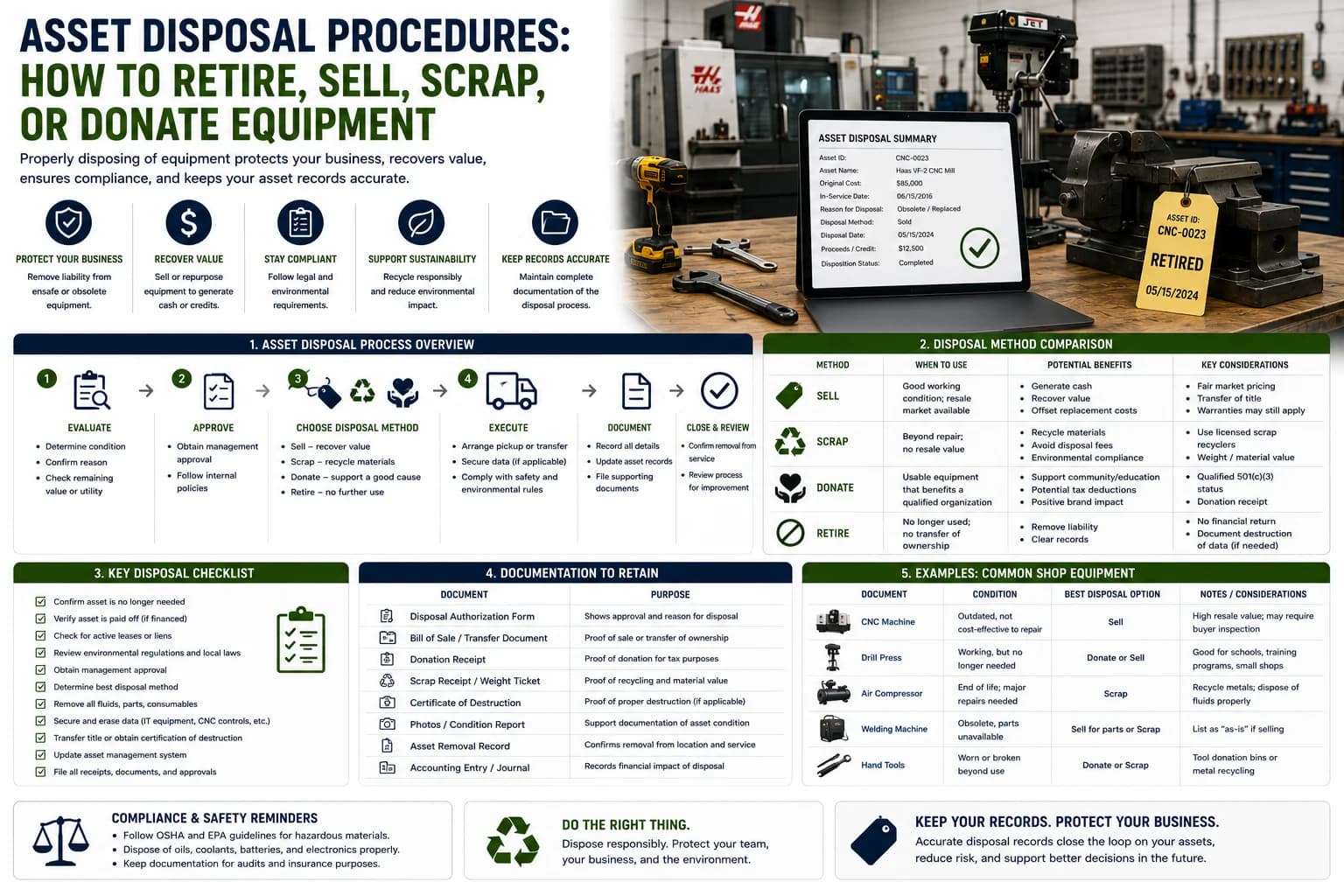
Asset disposal is the formal process of removing equipment from active service and documenting what happened to it.
Common disposal methods include:
- Sale
- Trade-in
- Scrap
- Donation
- Recycling
- Internal retirement
- Return to lender or lessor
The goal is to preserve the asset history while updating records so the equipment no longer appears available for use.
Why Disposal Procedures Matter
Poor disposal records create problems across the business.
Common issues include:
- Equipment still listed as active after it is gone
- Insurance schedules that include retired assets
- Missing sale or scrap receipts
- Inaccurate fixed asset records
- Confusion during audits
- Lost warranty, lien, or title information
Disposal is not just an accounting step. It is part of the full equipment lifecycle.
When Equipment Should Be Disposed
Equipment may be ready for disposal when:
- Repair costs exceed practical value
- Downtime is increasing
- Parts are difficult to obtain
- Safety risks cannot be corrected
- The asset no longer meets operational needs
- Replacement equipment has been purchased
- The equipment has no remaining business use
The decision should be based on documented condition, service history, business need, and financial impact.
Step 1: Confirm the Disposal Reason
Before disposing of equipment, document why the asset is being retired.
Common reasons include:
- End of useful life
- Excessive repair costs
- Obsolete technology
- Damage beyond repair
- Replacement by newer equipment
- Business closure or downsizing
Recording the reason helps finance, operations, and management understand the decision later.
Step 2: Get Approval
Disposal should require approval before equipment leaves the business.
Approval records should include:
- Asset ID
- Equipment name
- Disposal reason
- Recommended method
- Estimated value
- Approver name
- Approval date
Clear approval protects the business from unauthorized sales, removals, or write-offs.
Step 3: Review Financial and Legal Details
Before disposal, confirm whether there are restrictions.
Check for:
- Active loans or liens
- Lease terms
- Warranty obligations
- Insurance claims
- Title or registration requirements
- Tax or accounting considerations
Financed or leased equipment may require lender approval before sale or transfer.
Step 4: Document Final Condition
Record the asset condition at disposal.
Useful documentation includes:
- Photos
- Final meter reading
- Damage notes
- Maintenance history
- Inspection results
- Missing parts or attachments
This creates a defensible record if questions arise after the equipment is sold or scrapped.
Step 5: Record the Disposal Method
Each disposal method requires different documentation.
Sale
Keep buyer information, sale date, sale amount, invoice, bill of sale, and payment confirmation.
Trade-In
Keep the trade-in quote, purchase agreement, allowance amount, and details of the replacement asset.
Scrap or Recycling
Keep the scrap ticket, receipt, weight records, and any environmental documentation.
Donation
Keep donation acknowledgement, recipient information, and approval records.
Step 6: Update Asset Records
Never delete the asset history.
Instead, update the asset status to:
- Retired
- Sold
- Scrapped
- Donated
- Traded in
- Disposed
The asset record should retain purchase details, service history, photos, attachments, and disposal documentation.
Step 7: Notify Finance and Insurance
Disposal often affects financial and insurance records.
Notify the appropriate team so they can update:
- Fixed asset schedules
- Depreciation records
- Insurance policies
- Loan records
- Tax workpapers
- Equipment replacement budgets
This prevents retired equipment from remaining on the books or insurance schedule.
Common Asset Disposal Mistakes
Avoid these common problems:
Deleting Records
Deleting the asset removes valuable history. Retire the record instead.
Missing Approval
Unapproved disposal creates accountability and audit risks.
Incomplete Sale Documentation
Sale proceeds and buyer records should be retained.
Forgetting Insurance Updates
Businesses often continue paying insurance on equipment they no longer own.
Ignoring Attachments
Buckets, chargers, tools, keys, and accessories should be tracked during disposal.
Asset Disposal Checklist
A complete disposal process should include:
- Asset ID
- Disposal reason
- Approval record
- Final condition notes
- Photos
- Final meter reading
- Disposal method
- Sale, scrap, trade-in, or donation receipt
- Finance notification
- Insurance update
- Status changed to retired or disposed
Consistent documentation keeps asset records accurate throughout the full lifecycle.
Conclusion
Asset disposal procedures help businesses close the loop on equipment ownership. By documenting the disposal reason, approval, final condition, financial details, and records updates, organizations can avoid ghost assets, reduce audit issues, and maintain accurate equipment histories.
Equipment may leave the business, but its record should remain available for accounting, compliance, insurance, and operational reference.